デジタルマーケティングエンジニア 春山 勇悟のコラム「【sGTM】サーバーサイドGTMでCookieの寿命を延ばす方法」をデジタルマーケティングエンジニア JAIN Vibhor が英訳したものになります。
In this column, we explain the mechanism for using the server-side version of Google Tag Manager (hereafter sGTM) to extend the lifespan of cookies. If you want to understand the basics of server-side GTM first, please refer to our other column “Basic Knowledge of Server-Side GTM.” This explanation is structured so that even those unfamiliar with sGTM can follow along — please read to the end.
1. What is ITP and Why It Affects Data Measurement
2. How Short Cookie Lifespans Affect Measurement
3. How sGTM Can Extend Cookie Lifespan
4. Two Approaches to Configure sGTM So It Is Not Subject to ITP’s 7-Day Limit
Summary
ITP (Intelligent Tracking Prevention) is a privacy protection feature built into Apple’s Safari browser. It was introduced to prevent cross-site tracking and protect user privacy, and it has been strengthened multiple times since its initial release in 2017.
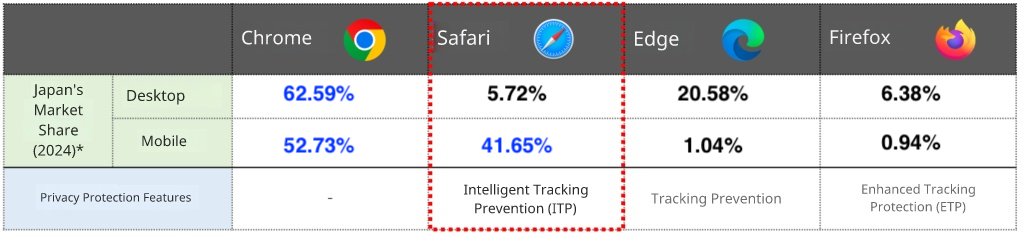
Refer: https://gs.statcounter.com/browser-market-share/desktop/japan/2024
In Japan, where iPhone usage is high, all browsers on iOS (including Chrome and Firefox) use Apple’s WebKit engine. As a result, they are also subject to ITP restrictions. This means that a large portion of mobile users are affected by these limitations.
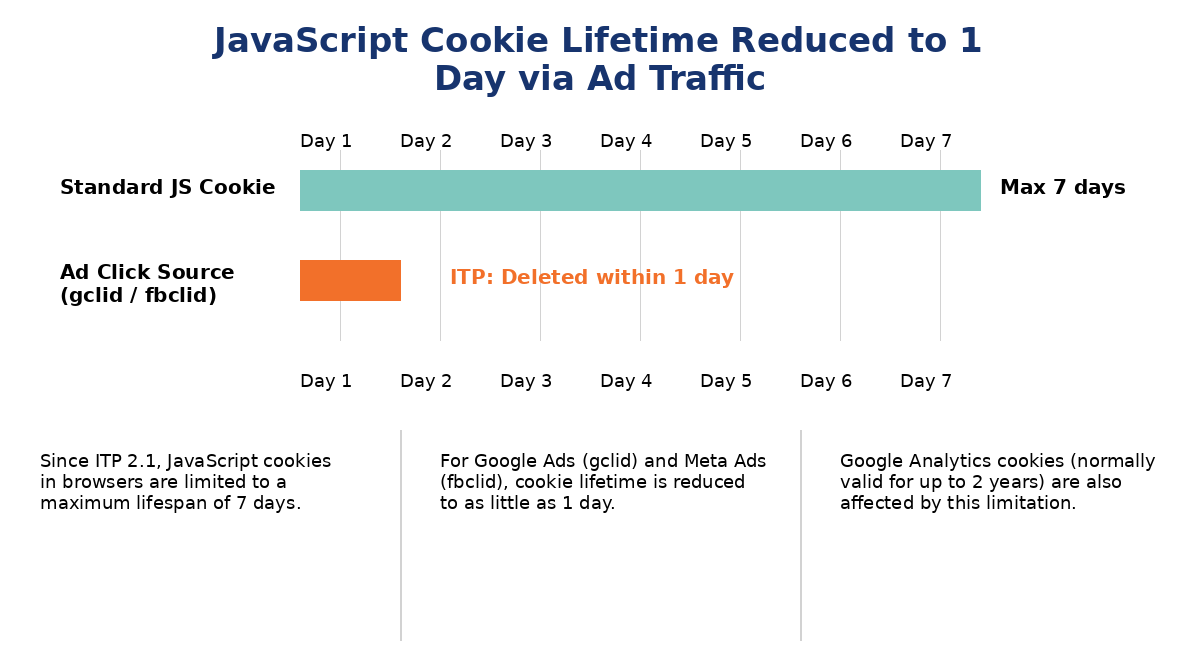
Since the release of ITP 2.1 in 2019, cookies set via JavaScript are limited to a maximum lifespan of 7 days.
However, under certain conditions, the expiration period can be shortened even further — to just 1 day.
For example:
gclid (Google Ads)fbclid (Meta Ads)When users visit a site via an ad click containing these parameters, not only the tracking cookie but all JavaScript-set cookies on that page may be restricted to a 1-day lifespan.
This creates a major challenge for accurate user tracking and measurement, especially for conversion tracking that relies on cookies lasting longer than one day.
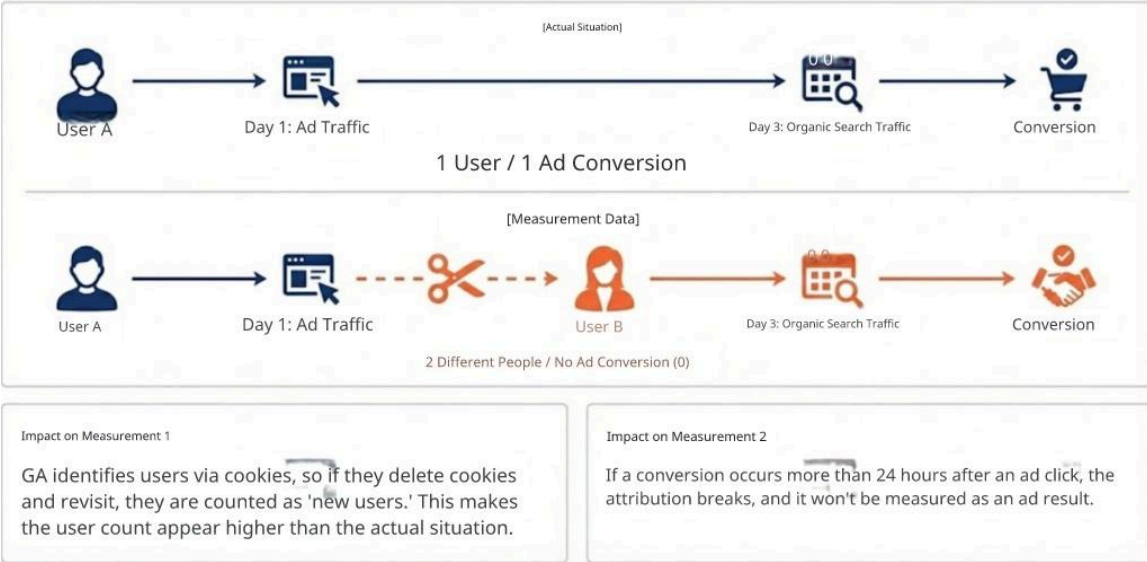
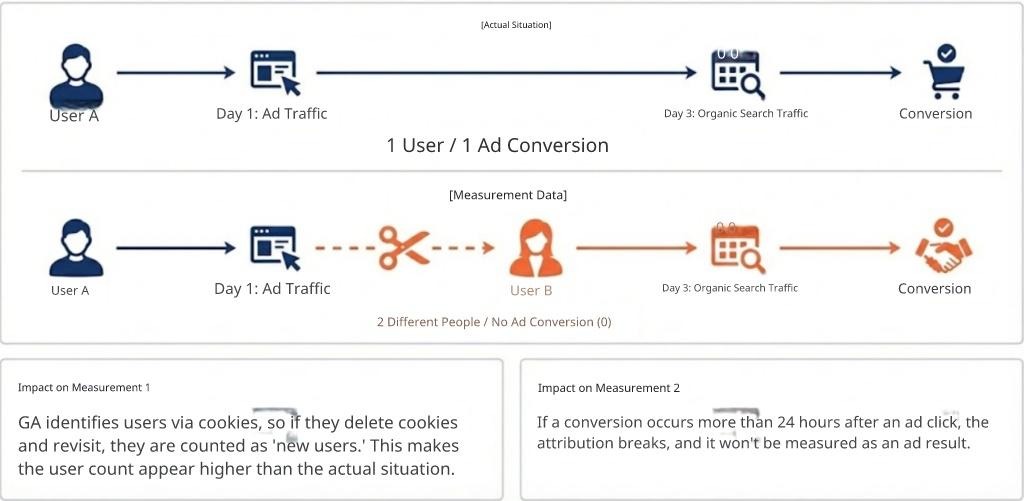
When cookie lifespans become shorter due to ITP restrictions, there are two major impacts on data measurement:
For example, Google Analytics (GA) identifies users using cookies.
If ITP causes the cookie to be removed, then even if a user comes back to the site again, GA cannot recognize them because the cookie no longer exists. As a result, GA’s reports may count returning visitors as new users, inflating the number of new users in your analytics data.
Shorter cookie lifespans also affect conversion measurement. For example:
In this case, the cookie created on the first visit has already been deleted, so the conversion cannot be linked to the original ad click. The result is that measured conversions may be undercounted, making it harder to evaluate ad effectiveness accurately.
In the previous section, we explained that cookies set via JavaScript are subject to ITP’s restrictions. First, it’s important to understand that cookies can also be issued in another way — by the server. There are two major ways to set cookies:
Since ITP restricts the lifespan of cookies set by JavaScript, it does not impose the same restrictions on cookies set by the server to the same degree.
Thus, by using server-side GTM (sGTM) to issue cookies from the server, we can improve cookie lifespan.
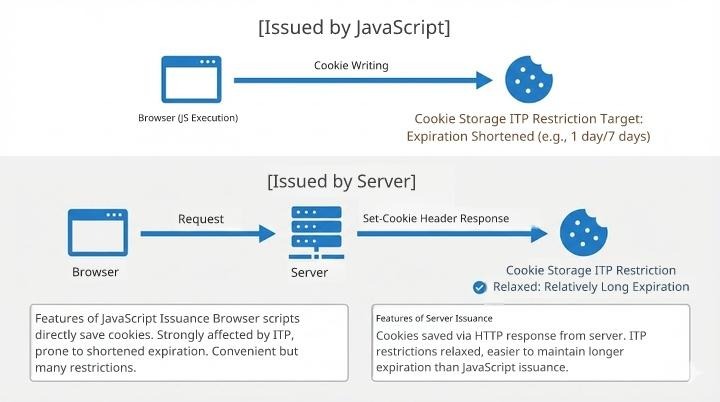
However, simply issuing cookies from the server does not automatically solve all limitations — the lifespan that cookies can be extended to depends on how they are issued.
How ITP Affects Server-Issued Cookies
ITP can also impose a 7-day maximum lifespan on cookies that are issued from the server if certain conditions are met:
By default, sGTM is usually set up on a subdomain separate from the main website. For example, if your website is www.example.com, the sGTM server might be at sgtm.example.com. These servers often live in completely different environments with different IP ranges — which means ITP will treat the cookies as eligible for the 7-day limitation.
In other words, although sGTM lets you issue cookies from the server, most standard sGTM setups still fall under ITP’s 7-day restriction. That’s where the next section’s approaches come in — methods to bypass even this 7-day limit.
When sGTM is installed on a subdomain, the website and the sGTM server usually have different IP address ranges, so ITP restricts the cookie validity period to 7 days. The Same-Origin Approach is a method to avoid this restriction.
First, to understand how it works, let’s briefly explain what an “origin” is. An origin refers to the https://www.example.com part of a URL. If this portion matches, it is considered the same origin; if it differs, it is a different origin.
For example, the following two URLs are the same origin because they share the domain even if their path parts differ:
https://www.example.com/page/https://www.example.com/sgtm/On the other hand, the following two URLs are not the same origin because their domains differ:
https://www.example.com/page/https://sgtm.example.com/sgtm/In the Same-Origin Approach, a dedicated path on the same origin as the website is prepared for sGTM, and data transmission to that path is routed to sGTM.
For example, if the website is www.example.com and sGTM is sgtm.example.com, and the dedicated path for sGTM is /sgtm/, then:
https://www.example.com/sgtm/)sgtm.example.comsgtm.example.com), but the browser sees all communication as with www.example.com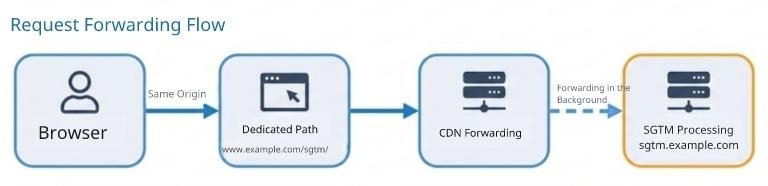
From the browser’s perspective, everything communicates with www.example.com. This means the server is not considered a different server with a different IP address range, so it does not become subject to ITP’s 7-day restriction.
Stape Cookie Keeper is a feature provided by Stape, the managed hosting service for sGTM.
The key characteristic of this approach is that it doesn’t prevent cookies from being deleted due to ITP, but restores cookies after they have been deleted.
To understand how Cookie Keeper works, the key concept is the “master cookie”. A master cookie is a cookie issued by the website operator’s own web server. Because it is issued from the same origin as the website server, it is less affected by ITP.
It’s not something that Stape automatically provides — you need to issue the master cookie yourself — but the implementation requirements are relatively simple and the difficulty is low.
Cookie Keeper uses the master cookie to record the values of measurement cookies on the Stape server side and restore them after ITP deletes them.
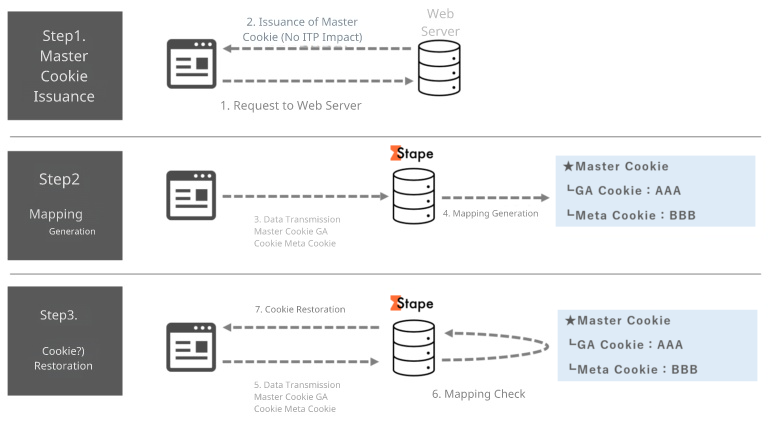
Specifically, it works in the following three steps:
After these steps, cookies appear to the user as if they were never deleted.
Using Cookie Keeper requires also using Stape’s Custom Loader feature. Because Cookie Keeper works through this Custom Loader, you need to update your GTM container snippet to the Custom Loader–compatible version.
(We will write about Cookie Keeper more later, meanwhile a Japanese article is here: 【sGTM】GTMのスクリプトを自社ドメインから配信する方法
Here we’ve looked at two methods: the Same-Origin Approach and Stape Cookie Keeper. Let’s summarize each one’s implementation requirements and points to watch.
aaa.example.com might be built with Cloudflare and allow same-origin setup, but bbb.example.com, which also needs measurement, might not use Cloudflare, meaning the same method can’t be applied there.In this column, we looked at how Safari’s ITP limits the expiration of cookies and how to alleviate that restriction by using sGTM.
JavaScript-issued cookies have their expiration limited by ITP to a maximum of 7 days, and in the case of visits from advertising traffic, can be shortened to as little as 1 day. When cookie expiration becomes this short, the same user may be counted as “new” repeatedly, and conversions from ads may not be measured correctly.
By introducing sGTM and issuing cookies from the server side, the lower bound of expiration can be improved from 1 day to 7 days, just by issuing cookies server-side. In addition, by using the Same-Origin Approach or Stape Cookie Keeper, you can configure your system to avoid the ITP 7-day limit altogether and set cookie expiration to the intended full duration.
Each approach has its own technical hurdles: the Same-Origin Approach requires reviewing infrastructure configuration, and Cookie Keeper requires rewriting your GTM container snippet. Overcoming these hurdles can further improve the accuracy of user data measurement.
Ayudante offers support for sGTM implementation. If you’d like help deciding which approach is right for your environment, or would like to consult on implementing sGTM from scratch, feel free to contact us.