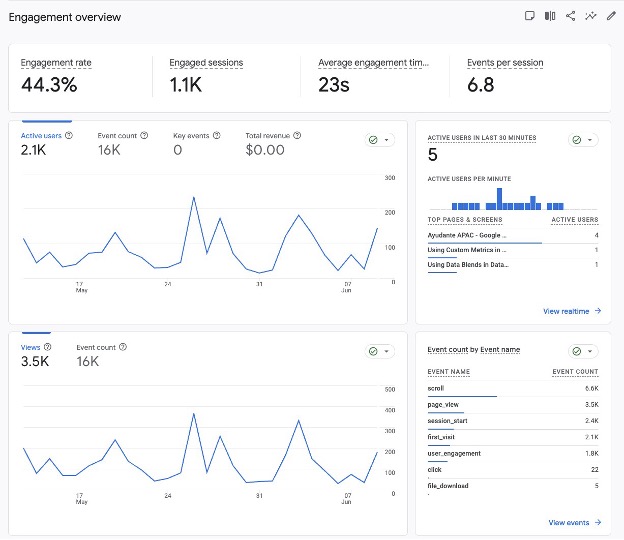
One of the most significant changes introduced with Google Analytics 4 (GA4) was the move away from Bounce Rate as the primary measure of user engagement.
For many marketers, Bounce Rate was a familiar KPI. A high bounce rate often raised concerns, while a lower bounce rate was typically interpreted as a sign that visitors were finding value in a website.
The challenge was that Bounce Rate didn't always reflect how people actually interacted with modern websites.
Consider a visitor who lands on a blog article, spends five minutes reading it, finds the information they need, and then leaves. Under Universal Analytics, that session could still be classified as a bounce because only one pageview occurred.
From the visitor's perspective, the experience was successful. From the analytics platform's perspective, it appeared unsuccessful.
GA4 attempts to address this limitation by introducing Engagement Rate.
Rather than focusing on whether users continued to another page, GA4 focuses on whether meaningful interaction occurred during the session.
Before examining how Engagement Rate works, it's worth understanding why Google changed the measurement approach in the first place.
Bounce Rate was originally designed during a period when websites were structured very differently.
Users often navigated through multiple pages to complete a task, making pageviews a reasonable proxy for engagement.
Today, many websites are designed around content consumption:
For these types of websites, a single-page session isn't necessarily a bad outcome.
A visitor may:
This made Bounce Rate increasingly difficult to interpret as a measure of content quality or user satisfaction.
GA4 introduces the concept of an engaged session.
A session is considered engaged when at least one of the following occurs:
Engagement Rate is calculated as:
Unlike Bounce Rate, this allows GA4 to recognise sessions where visitors spend meaningful time consuming content, even if they never navigate to a second page.
One common misconception is that Bounce Rate was removed entirely.
It wasn't.
GA4 still provides Bounce Rate, but it is now calculated differently.
In GA4:
Bounce Rate = 100% − Engagement Rate
This means Bounce Rate now represents sessions that failed to meet GA4's engagement criteria.
As a result, Bounce Rate figures from Universal Analytics should not be compared directly with Bounce Rate figures in GA4.
The underlying calculations are fundamentally different.
Let's compare two sessions.
A visitor lands on a detailed article and spends four minutes reading it before leaving.
A visitor lands on the same article and leaves after two seconds.
Under Universal Analytics, both sessions could potentially be counted as bounces.
Under GA4, only Session A qualifies as an engaged session.
This is a much closer reflection of actual user behaviour.
For content-heavy websites, publishers, SaaS companies, and educational resources, Engagement Rate often provides a more realistic view of how visitors interact with content.
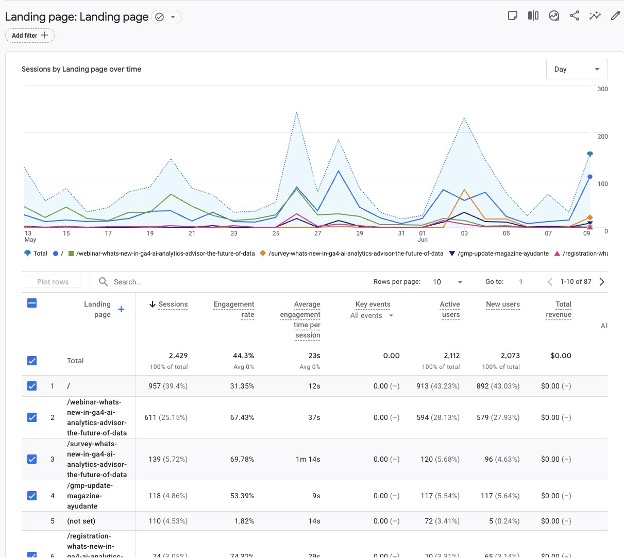
One issue I frequently encounter during GA4 audits is the assumption that a higher Engagement Rate automatically indicates better performance.
In reality, Engagement Rate only tells us whether users met GA4's engagement criteria.
It doesn't tell us whether they achieved a business objective.
For example:
A support article may generate an Engagement Rate above 90% because visitors spend time reading it.
A pricing page may produce a lower Engagement Rate but generate substantially more revenue.
Neither metric is inherently better without context.
The more useful question is:
Did the page achieve the purpose it was designed to serve?
Although Engagement Rate is an improvement over Bounce Rate, it still has limitations.
A session lasting 11 seconds qualifies as engaged.
That doesn't necessarily mean the visitor found value.
Likewise, a user may find the exact answer they need in six seconds and leave immediately.
That session would not qualify as engaged despite successfully meeting the user's objective.
This is why experienced analysts rarely evaluate Engagement Rate in isolation.
Instead, they combine it with:
One of the most useful content consumption signals is scroll behaviour.
GA4's Enhanced Measurement automatically records a scroll event when users reach approximately 90% of a page.
Many teams interpret this as evidence that users consumed the content.
In practice, scroll depth and content consumption are not the same thing.
A visitor can rapidly scroll to the bottom of an article without reading it.
Conversely, a visitor may carefully read half of an article, find the information they need, and leave before triggering the default scroll event.
The standard scroll event measures page depth.
It does not measure attention.
GA4 Navigation
Reports → Engagement → Events
Capture
Purpose: Introduces GA4's default scroll tracking implementation.
For content-focused websites, implementing additional scroll thresholds through Google Tag Manager can provide significantly more context.
Typical thresholds include:
This creates a clearer picture of how users progress through content.
For example:
At first glance, an article might appear successful because Engagement Rate is high.
However, the scroll distribution may reveal that most visitors never reach key content sections.
GA4 Navigation
Explore → Free Form
Rows
Metrics
Purpose: Demonstrates progressive content consumption rather than binary engagement.
The most useful scroll analysis doesn't focus on percentages.
It focuses on what exists at those percentages.
For example:
This shifts the conversation away from measuring scrolling behaviour and towards measuring exposure to content that matters.
In many cases, these insights are more actionable than Engagement Rate itself.
Rather than relying on a single metric, consider evaluating content using a combination of:
This approach creates a more complete picture of user behaviour than any individual metric can provide.
GA4's Engagement Rate represents a meaningful improvement over the traditional Bounce Rate metric.
It better reflects how people interact with modern websites and recognises that valuable sessions don't always involve multiple pageviews.
However, Engagement Rate should be treated as a starting point rather than a definitive measure of success.
The most valuable insights emerge when engagement metrics are combined with conversion data, content consumption signals, and an understanding of page intent.
Ultimately, the objective isn't to determine whether a session was engaged.
It's to understand whether visitors found value and whether the content supported the outcomes that matter to the business.