Does your business have a website and a mobile app? And does your mobile app predominantly display content from your website? If yes, you may be facing measurement issues where the data for the website and mobile app is separate and disjointed. That means, you may not be able to understand the user journey because it's difficult (or even downright impossible) to stitch the data together.
Read on to understand the reasons behind the measurement challenges and learn how you can solve them.
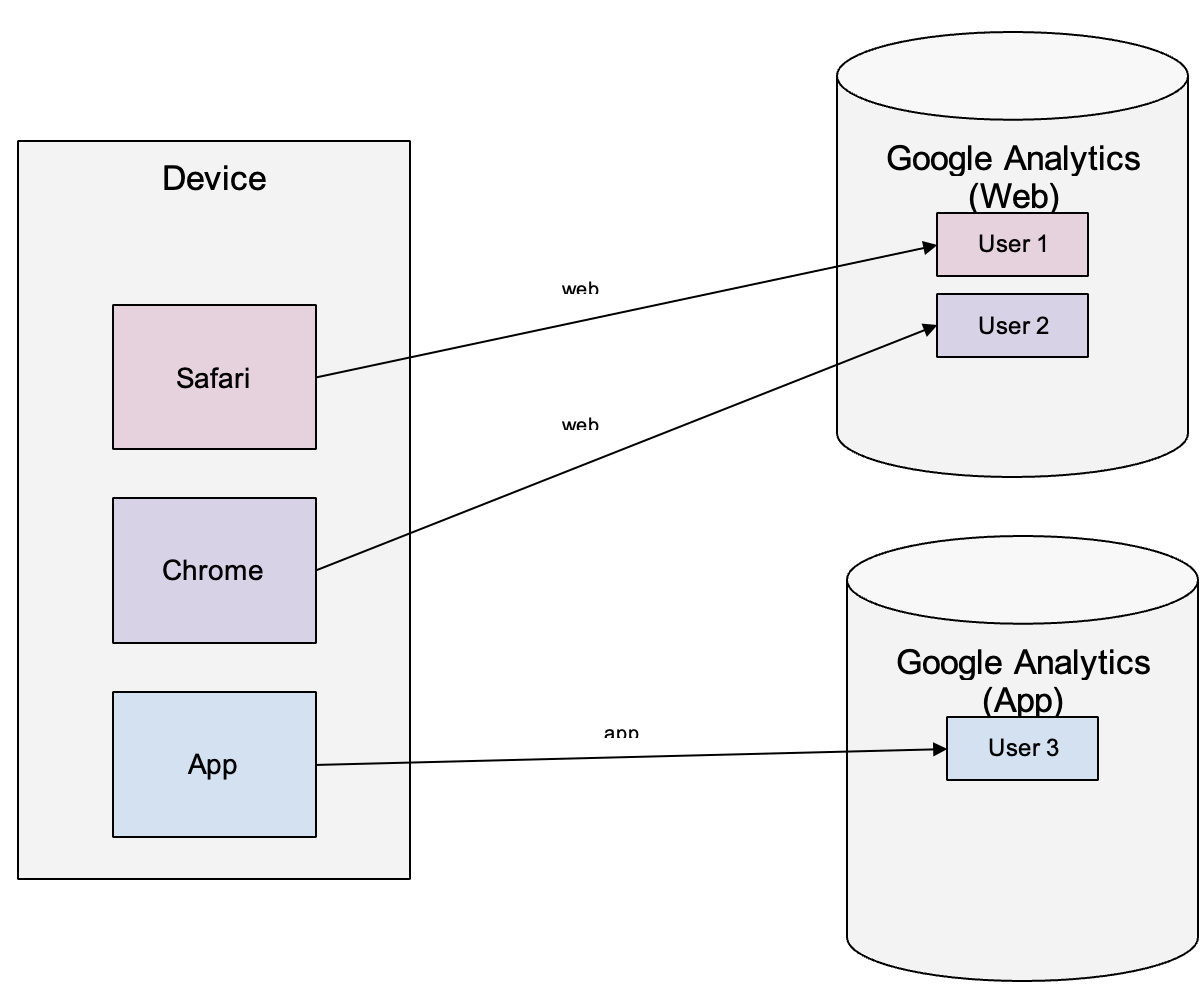
Google Analytics (GA) is commonly used to measure user activities on websites and mobile apps. However, for mobile apps, there can be three scenarios:
These three scenarios have different measurement methodology and challenges. In this article, we will explain the differences and show you a different approach when measuring hybrid apps.
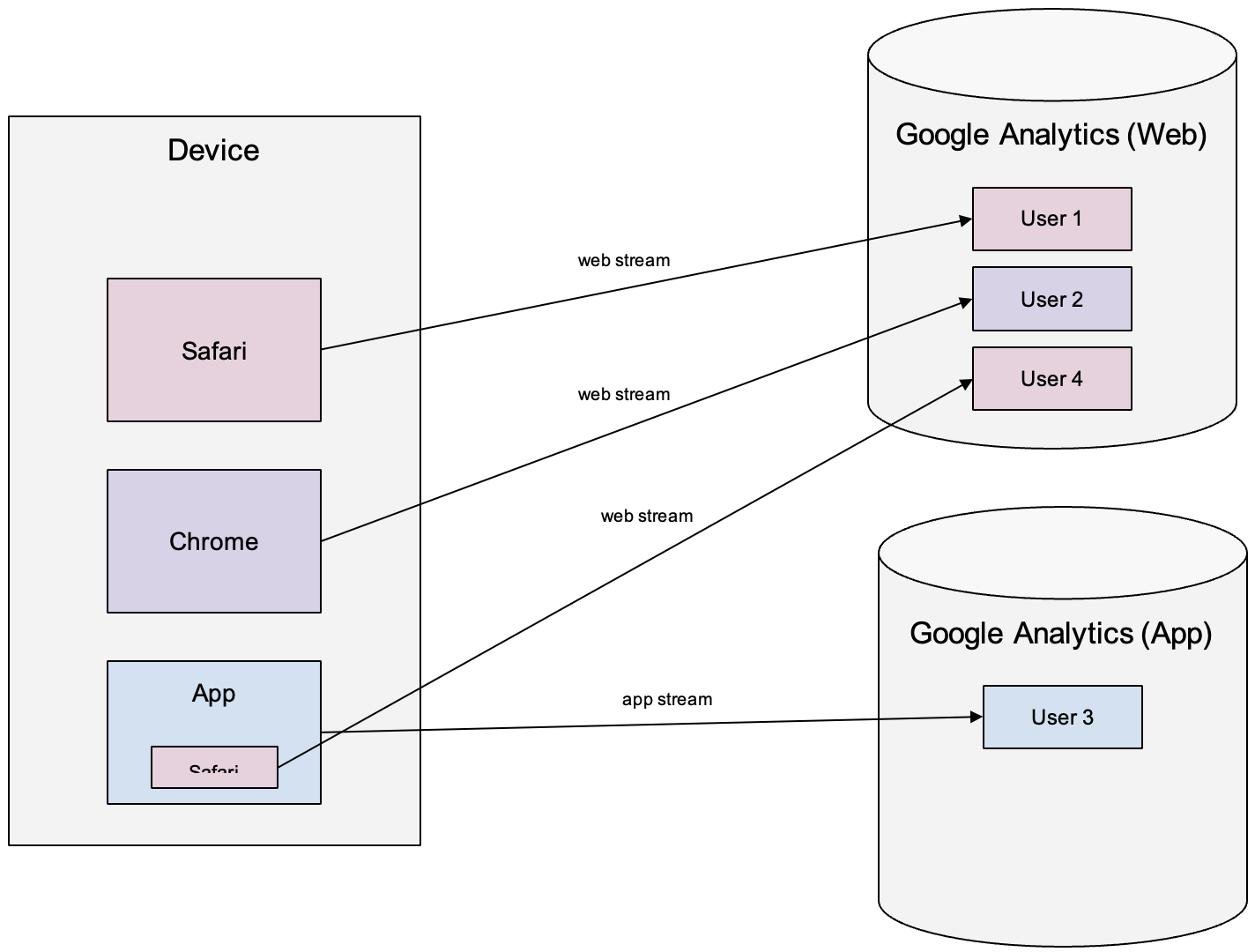
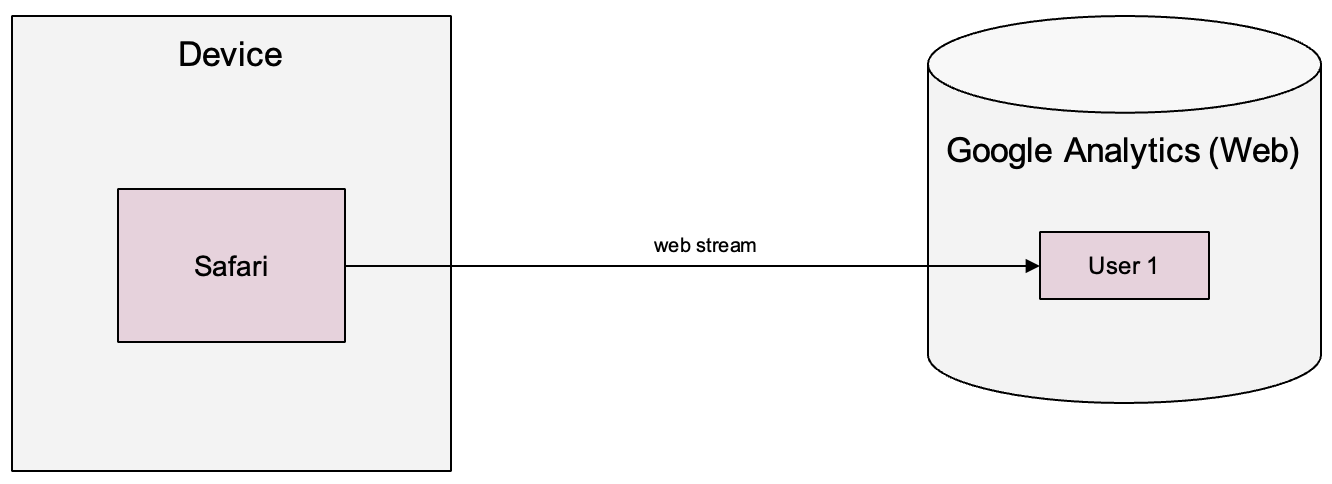
(1) Let's start here. When you use a web browser on a device, GA assigns a pseudo random ID to a browser cookie, and you are tracked as "a user".
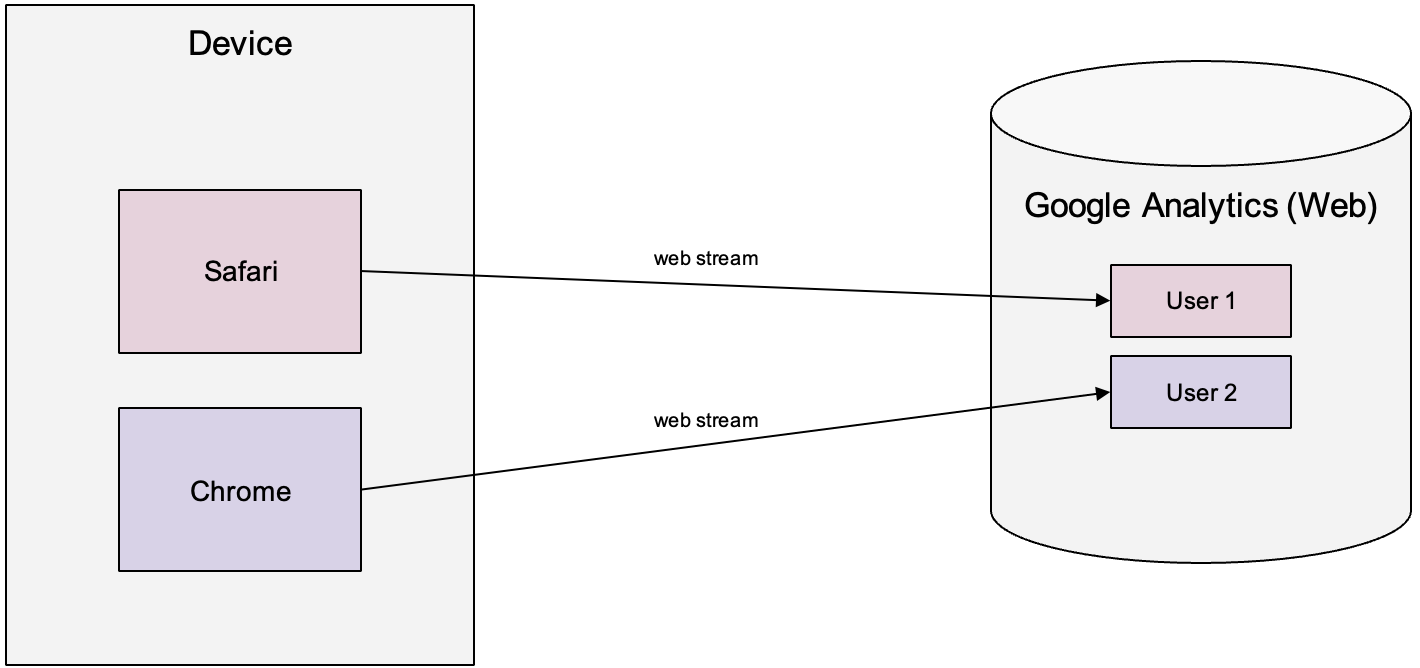
(2) When you use another browser on the same device, GA assigns a different ID, and you are tracked as a different user. GA has no way of telling if you are the same person unless you send a first-party hashed logged-in user identifier. However, as explained in the linked article, this method only works if your website or app is designed to work predominantly for logged-in users only.
(3) When you use an app, GA assigns a different ID (aka Installation ID), and you are tracked as yet another different user. Note that the app stream can go to the same GA property as the web ones. But this is not a common practice as the website and app can behave differently and have different measurement structure. For illustration purposes, the app in our diagram will send data to an app-specific GA property.
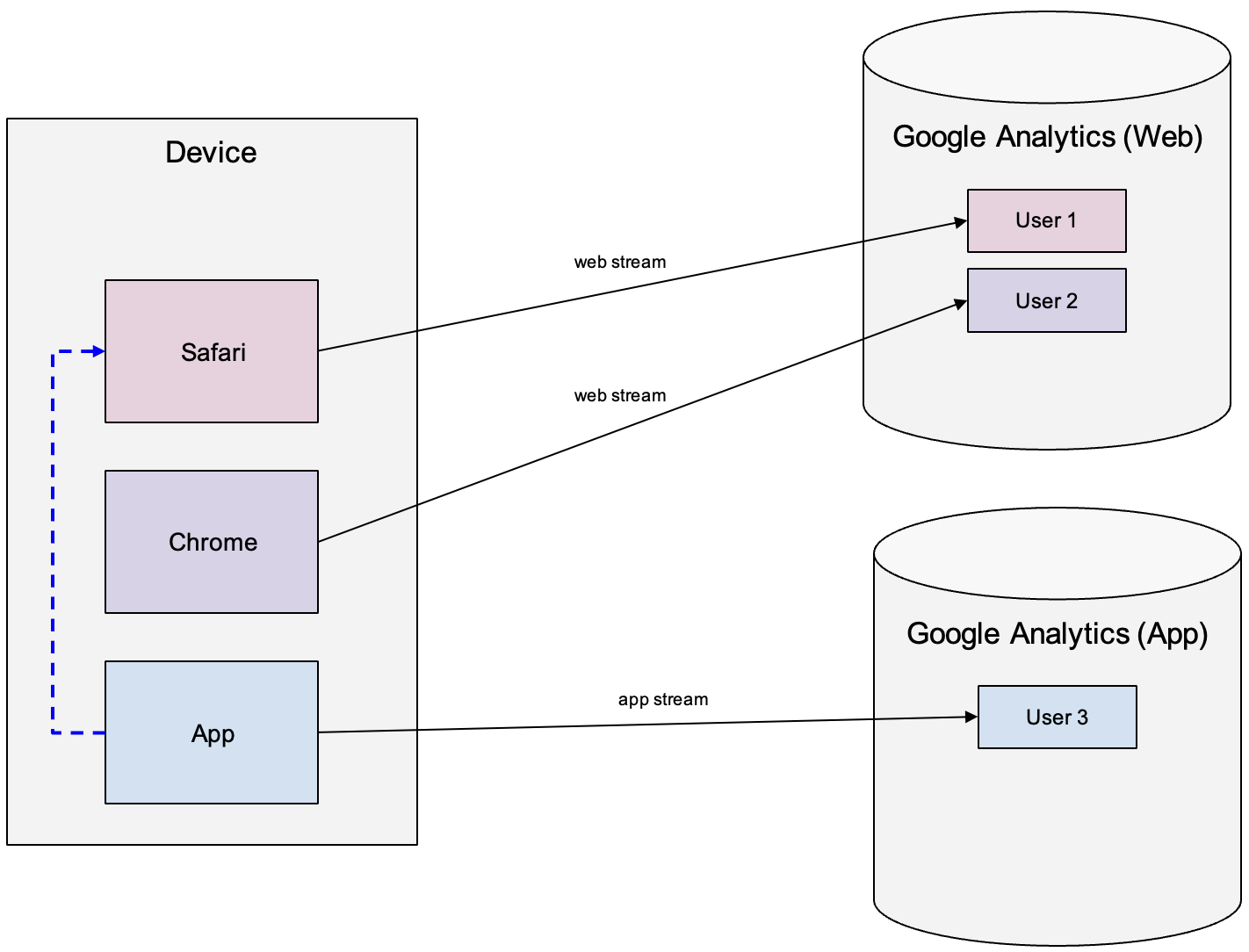
(4) When the app opens a standalone browser to a web content (illustrated by the blue arrow), it will be the same GA user as User 1.
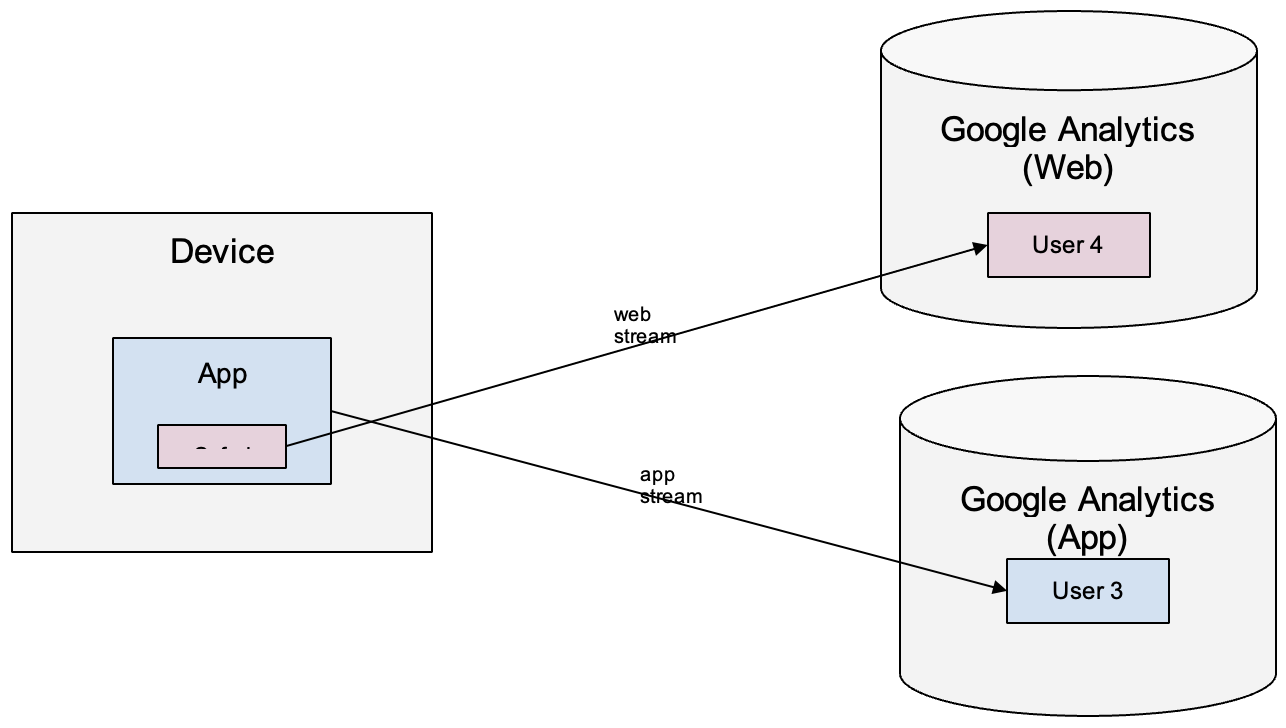
(5) When the app display a web content using WebView, the WebView has a different environment then the standalone browser. Because of this, GA assigns yet another different user ID.
If the app uses the WebView content sparingly and the content is non-critical (eg. faq, help, articles), then this method is fine.
Let us focus only on the app, we want to go from the standard method, which creates disjointed data.
To a method where:
The result is seamless app and webview activities recorded in the same GA property.
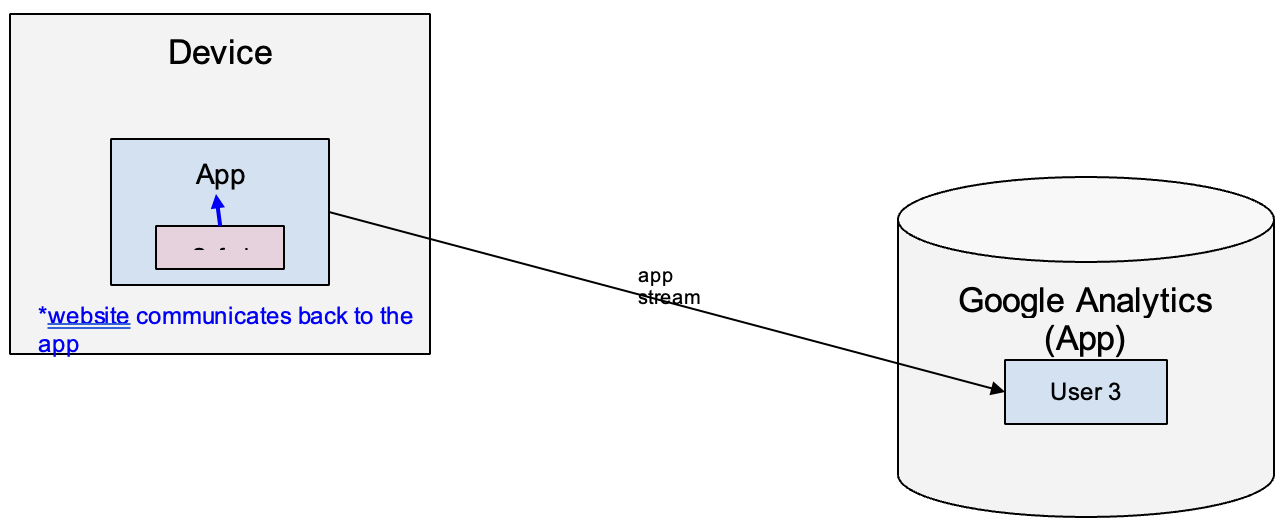
Using this measurement method is straightforward in principal and it requires minimal code changes from the web and app developers. Generally, we can break it down into these steps:
Implement the native interface to RECEIVE events and user property settings from the website (in webview context)
Implement the JavaScript handler to SEND events and user properties settings from the website
In Google Tag Manager (GTM), duplicate the existing GA tags into Custom HTML tags which INVOKE the above JavaScript handler to communicate the events or user property settings back to the app. To further break it down:
(a) Duplicate GA tags
For each GA tag that you have in GTM, for example:
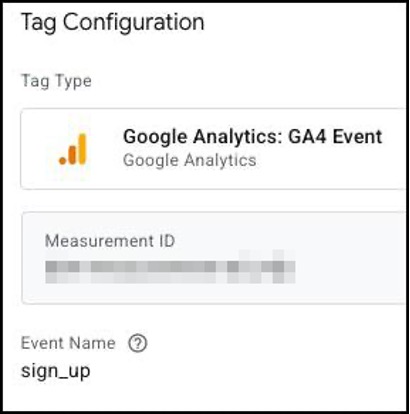
Make a Custom HTML tag version that communicates the same event and parameters back to the app. For example:
logEvent("sign_up", eventParams);
(b) Detect WebView context
Work with the web and app teams and determine a reliable method that you can use in GTM to detect if the user's web browsing session is in standalone browser or app webview context. You may be able to find JavaScript solutions on the internet but it's best to check with the web and app teams for a foolproof solution with good security. Once you have determined this method, use it as triggers or exception triggers in GTM:
That's the basic premise of how this hybrid app measurement approach works.
With the implementation done correctly, when an app user brow the native app and WebView content, the measurement is recorded in ONE GA property, as the SAME user, and in the SAME session.
As can be seen from this User Explorer report example, in one session:
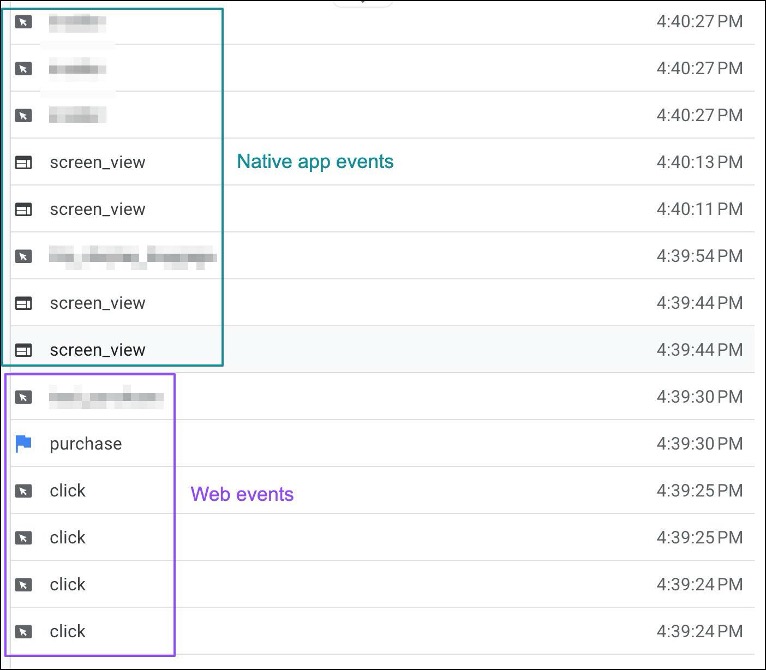
This allows you to easily gather the insights that you need for your business, such as
Technically, the hybrid app measurement implementation is simple. However, because we are essentially merging the web data structure into the app data structure, there are a few things to consider when it comes to the data structure design.
As mentioned above, to avoid duplicate data, you will want a reliable method to detect if the browsing session is in standalone browser or webview context. This determines how you load the tags in GTM, or even how you load the GTM container(s).
Because the app continues to record webview events in app stream, it can be difficult to identify which GA events are from webview. To better support your data diagnosis and analysis, you can create a new custom dimension and record a boolean value when the event is from webview, for example:
is_webview = y
You can manually set this parameter in the WebView GTM.
When measuring page/screen views:
But both will update the Views metric. If you only use the Views metric in your reports, then no changes are required. However, some teams may prefer to convert "page_view" into "screen_view" for consistency. That is, "If user views a web page on the app, it should be considered a screen_view". In this case, you will need to make this change in GTM.
For the input parameters:
As you can see, there are fundamentally different. In web reporting, you tend to use the URL segments such as hostname or page path. In app reporting, you tend to use screen names.
The problem is that the output dimensions in GA are "combined". Examples:
We think the original idea by Google is that you would do web streams and app streams reporting in GA separately. However, this idea doesn't work for hybrid apps where both native and webview navigations are used.
Another issue that we found is that, the app parameters (eg. screen_class, screen_name) tend to take precedence since it's an app stream. For example, in WebView you set:
But when you look at the GA dimensions in reports, it may turn out to be:
We are essentially merging app and web measurements into one property, you need to ensure that the custom dimensions and metrics are properly migrated from the web property to the app property. Because web and app can have fundamentally very different measurement structure and goals, you may face challenges such as:
In GTM, you can create a Google Tag: Event Settings variable like:
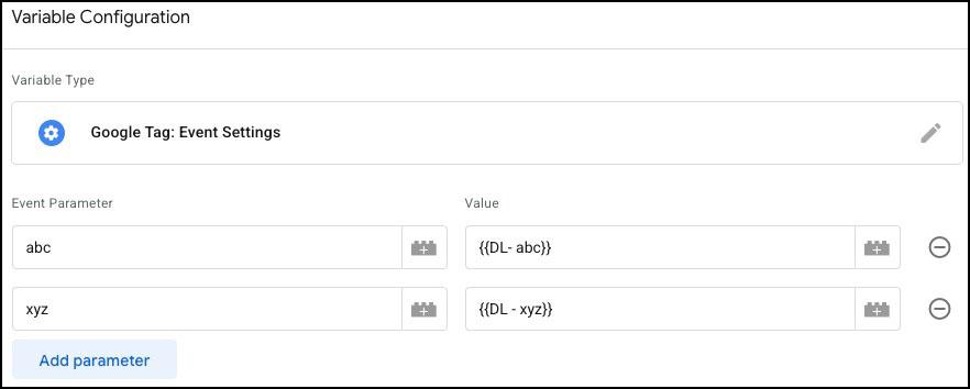
And then add this variable to all GA tags so that the parameters can automatically be included in all GA events.
When doing hybrid app measurement, you can do the same by:
(1) Creating a Custom JavaScript variable like:
function () {
return {
abc: "{{DL - abc}}",
xyx: "{{DL - xyz}}"
};
}
(2) Add this variable to event parameters in every WebView Custom HTML tag like:
<script>
(function() {
   	// Shared event parameters
   	var eventParams = {{CJS - WebView Event Settings}};
   	// Add/overwrite event parameters
   	eventParams.something_else = "hello world";
   	// Log event
   	logEvent("your_event", eventParams);
})();
</script>
When using GA tags in GTM, GA user properties are "piggybacked" onto every GA event. That means, if there are multiple GA events on a page, the user properties are set on every GA event, even if the values don't change.
Doing the same for the hybrid app measurement is probably an overkill. Instead, what we can do is:
That way, we avoid the unnecessary WebView-to-App communications when the user properties are not likely to change on the same page.
In GA, you may have some custom event configurations. For example, you may have something like this:
If page_location = https://www.example.com/membership/thankyou
Then create a new event: sign_up
Note that for hybrid app measurement method, this doesn't work because:
To unify this process, we suggest to do the following:
That way, you can maintain the two sets of tags in GTM side-by-side, to ensure consistency.
When users are logged-in on the app, the app may record first-party user info in the app stream. For example:
For WebView, because the users may not be logged-in on the website. If the app is solely relying the events from the WebView, then the app logged-in user info may be missed on the events.
To prevent the data gap:
App opens a WebView using a standard URL. For example:
https://www.example.com/
Note that if the URL contains UTM parameters, eg.
https://www.example.com/?utm_source=myapp&utm_medium=app
They have no effect at all to the current GA session on the app. This is because:
The only exception is if the app displays an option for users to open the WebView in a standalone web browser. When clicked, the web browser will launch and users will be using it to view the web content. In this case, GA tags will execute and activities will be recorded to the web property instead.
Web and app are fundamentally different – in the way pages/screens are interpreted and how users interact with the content. Supporting hybrid app measurement where both native and webview content is used can be a challenge. But with careful planning and design, you can unify the data structure and allow the team to easily draw insights from Google Analytics.